


Regular video posting now influences visibility in social, educational, and commercial media. But more videos can mean more time spent editing, more money spent, and more pressure to be creative. AI movie tools streamline repetitive tasks and support smaller teams in keeping production flowing smoothly. Pippit facilitates this process with generation, editing, resizing, and publishing capabilities. It streamlines the video creation process, enabling creators to produce high-quality videos more efficiently.
Why Traditional Content Scaling Reaches Its Limits
Traditional scaling typically correlates with increased output and increased spend and operational complexity. Each extra video may need to be scripted, shot, edited, reviewed, formatted, and published. Creative bottlenecks happen where a small team is juggling numerous production requests. There is also a lot of time spent manually editing the videos, trimming, adding captions, effects, transitions, and resizing. When deadlines are shortened, the review time can be reduced, which may lead to inconsistencies in quality. Automation tackles these pressures, decreases repetitive work, and maintains human creative choices. A workflow for AI movie can thus help teams to boost volume without the additional production overhead.
Smart Ways AI Movie Makers Expand Content Production
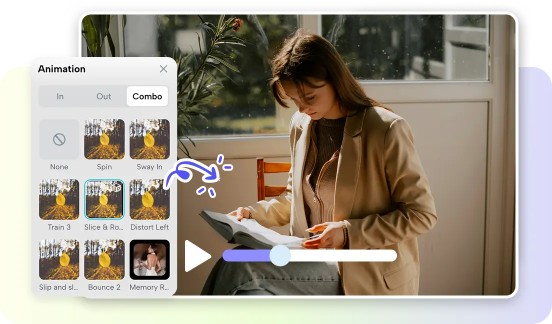
Pippit can take one idea and create a number of formats to suit various publishing requirements. One concept can turn into short social clips, explainers, promotional edits, or educational videos. Automated editing minimizes repetitive tasks such as pacing, captioning, transitions, and visual tweaks. Pippit also assists in keeping things in view that may be used in many different projects. The use of templates, reusable assets, and consistent styling can help bolster recognition across campaigns. A story studio approach can help to structure ideas into linked visual stories pre-production. The faster you can generate, the more time you have for creative refinement, audience research, and content planning.

Steps to Multiply Your Content Output Without Hiring Using AI Movie Maker
Step 1: Create your AI content workflow
- Sign up for Pippit using your Google, TikTok, or Facebook account details.
- Open the “More” tab from the left vertical menu bar and select “Video generator”.
- Choose an AI model like Dreamina Seedance 1.0, Dreamina Seedance 2.0, Dreamina Seedance 2.0 Fast, Dreamina Seedance 2.0 Mini, or Dreamina Seedance 2.5.
- Add a detailed text prompt with your movie idea, character details, formats, effects, and camera angles.
- Select video length, language, subtitles, and aspect ratio based on your content needs.
- Click “+” to upload reference images or videos from your device, phone, Dropbox, or a link. You can also select available assets.
- Click “Generate” to create your movie.
Step 2: Generate more content versions
- After clicking “Generate”, Pippit’s AI video generator creates a movie using your prompt and reference media.
- The AI manages editing elements like transitions, pacing, captions, avatars, voice, lyrics, and visual enhancements.
- Review the movie draft and create different versions for more content output.
Step 3: Edit and export content
- Click the “Download” tab in the top right corner to save the movie. Click “Regenerate” for a new version or select “Edit more” below the video for advanced editing.
- Customize captions, text, size, color, alignment, filters, and effects.
- Add background music, remove backgrounds, and adjust visuals.
- Click “Export” when your movie is ready.
- Select “Publish” to share on TikTok, Instagram, or Facebook, or click “Download” to save it with your preferred format, resolution, frame rate, and quality.
Features That Help Pippit Produce More Content in Less Time
Pippit brings together practical features to minimise production friction when repeated projects are performed. The tools allow for quicker creation without sacrificing manual creative control. An ad maker workflow can also accommodate repeated variations in promotion.
- One-click AI generation: Transforms prompts into movie drafts and cuts down on repetitive set-up tasks.
- Advanced editing features: Make precise transitions, fine-tune captions, effects, audio, and video without using complicated software.
- High resolution exports: Maintain good visual quality for professional publishing and other viewing environments.
- Auto-crop feature: Resize videos to fit various aspect ratios, eliminating manual cropping.
- Flexible media uploads: Bring in reference images, video, and cloud resources to create richer creative output.
- Built-in publishing features: Export completed content or publish via supported social channels.
Repurposing One Content Idea into Multiple Movie Variations
Repurposing maximises the life of every researched topic, script, recording, or campaign idea. A blog can be converted to a narrative explainer that includes images and short captions. A detailed script can turn into structured visual storytelling with scene-specific pacing. Educational resources can be lessons, summaries, demonstrations, or short knowledge clips. Promotional edits can be done using existing footage, thus avoiding the need for new production. Variations can be made to deliver to different audiences with different lengths, language, graphics, and messaging. Pippit helps to simplify these adaptations, and at the same time maintain the central idea recognizable.
Building an Efficient AI-Assisted Content Workflow
Efficient production begins before generation has even started. The prompts should be clear and specify the topic, the audience, the visual direction, pacing, and desired outcome. The logos, product photos, video footage, audio, and branding assets should continue to be kept organized and be reusable. Templates allow to standardize similar layouts and reduce repetitive setup activities. Drafts generated should be reviewed in a focused manner, rather than the focused review taking the form of frame-by-frame inspection. Review the opening, pacing, captions, audio, transitions, and closing message first. Then there can be several versions to support various publishing schedules, platforms and audience segments. This workflow allows Pippit to offer a consistent production without being cookie-cutter.
Best Practices for Maintaining Quality While Increasing Volume
Increased volume should not be a substitute for good creative quality or considered thought. Make prompts descriptive, structured, and specific enough to lead to reliable generation. Check pacing – automated sequences can still be too fast or too slow. Use the same logos, typography, colors, and other brand elements. Match the aspect ratios to the platforms rather than stretching/cropping key visuals. Update the visuals regularly to avoid repetition of content. Always check captions, sound level, factual statements and continuity of images prior to publication. Human review is still necessary as automation helps in production but not editorial decision-making.
Conclusion
AI-powered film production can eliminate numerous obstacles to consistent video production. Pippit’s generation, editing, auto-cropping, media uploads, and export features are all in a single workflow. With these characteristics, people and lean teams can generate more content without a proportionate number of personnel. Recycling also enables one good idea to serve more than one medium and more than one target group. Quality can continue to be aligned with higher volume with structured prompts and careful reviews. This is a process that is scalable, ensuring both creative control and less repetitive production work.