
Introduction: Understanding the Modern Accounting Software Landscape
When we think about how businesses manage their finances today, we are witnessing a profound transformation that would have seemed almost magical just a decade or two ago. The accounting software landscape in 2026 represents the culmination of years of technological advancement, where artificial intelligence, cloud computing, and automation have converged to create tools that do far more than simply record transactions. These platforms have evolved into comprehensive financial management systems that provide real-time insights, predict cash flow patterns, detect anomalies before they become problems, and free business owners from countless hours of manual data entry and reconciliation.
This guide will help you navigate these choices by providing a comprehensive educational exploration of the top ten accounting software platforms dominating the market in 2026. Rather than simply listing features and prices, we will explore how these platforms work, what makes each one unique, who they serve best, and how to think about choosing the right solution for your specific situation.
We will examine not just what these platforms do today, but where the industry is heading and what trends will shape the accounting software landscape in the coming years. By the end, you will have the knowledge and framework necessary to make an informed decision about which accounting software platform aligns best with your business needs, technical comfort level, budget, and growth trajectory.
1. QuickBooks Online: The Comprehensive Market Leader
QuickBooks Online stands as the undisputed market leader in accounting software for small and mid-sized businesses, serving over seven million businesses worldwide according to Intuit’s reported figures. The platform’s dominance stems not from any single killer feature but rather from a comprehensive combination of robust functionality, extensive integrations, strong support infrastructure, and continuous innovation that keeps it at the forefront of industry trends.
Understanding QuickBooks Online requires appreciating its evolution and breadth. Intuit, the parent company, has been developing accounting software since the 1980s, building deep expertise in how businesses actually use financial tools and what pain points they encounter. This institutional knowledge manifests in thoughtful design decisions throughout the platform. The interface manages to accommodate sophisticated accounting features while remaining accessible to users without formal accounting training. The learning curve exists, particularly for complete beginners, but countless resources including tutorials, webinars, certification programs, and active user communities help users climb that curve efficiently.
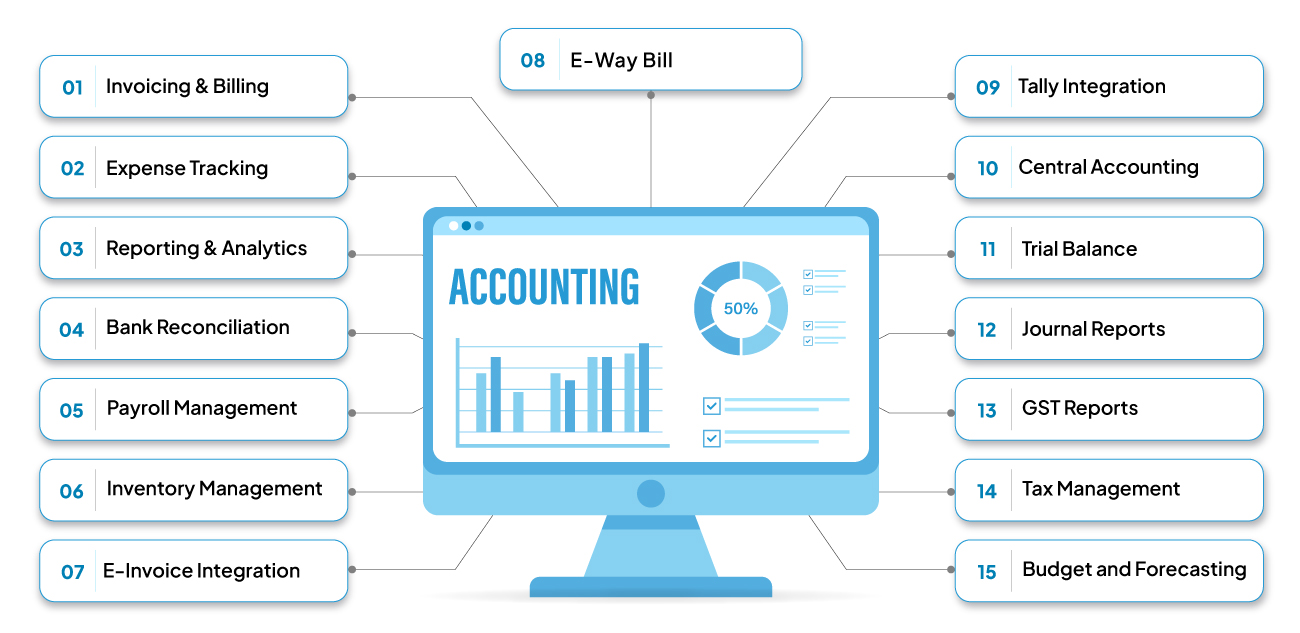
The feature set QuickBooks Online provides covers virtually everything a small to mid-sized business needs for financial management. The invoicing system allows unlimited invoice creation with customizable templates, automatic payment reminders, and integrated online payment processing that lets customers pay directly from invoices. The expense tracking automatically imports bank and credit card transactions, learns your categorization preferences over time, and even allows you to photograph and upload receipts that get automatically matched to transactions. The reporting engine generates dozens of standard financial reports while also providing custom report builders that let you slice data exactly as needed for your business decisions or stakeholder communication.
What truly distinguishes QuickBooks Online is its ecosystem rather than any single feature. QuickBooks’ 750+ integrations provide extensive options for workflow customization, meaning that virtually any other business tool you use can likely connect with QuickBooks. Your e-commerce platform syncs sales automatically. Your payment processor reports transactions in real time. Your customer relationship management system shares revenue information. Your project management tool sends time tracking data for billing. Your inventory system updates cost of goods sold as you ship products. These integrations eliminate the duplicate data entry and manual reconciliation that consume hours and create opportunities for errors. The platform becomes a central hub that aggregates financial information from across your business operations.
The pricing structure for QuickBooks Online operates on a tiered subscription model with four main plans designed to serve businesses at different sizes and complexity levels. The Simple Start plan, currently priced at thirty dollars monthly though often discounted for new customers, provides core functionality suitable for very small businesses with straightforward needs. This entry tier includes basic invoicing, expense tracking, tax deductions tracking, and the ability to manage sales tax.
Moving up, the Essentials plan at fifty-five dollars monthly adds bill management capabilities, allowing you to track what you owe suppliers and schedule payments, along with support for multiple users and time tracking that can be billed to customers. The Plus plan at eighty-five dollars monthly expands into inventory tracking and project profitability analysis, making it appropriate for product-based businesses or service companies that need project-level financial visibility. Finally, the Advanced plan at two hundred dollars monthly provides enhanced customization, automation workflows, dedicated customer support, and capacity for up to twenty-five users, serving larger or more complex operations.
Recent developments have focused heavily on integrating artificial intelligence throughout the platform. In 2024 and continuing into 2025, Intuit introduced generative AI features that allow users to interact with their financial data through natural language. Rather than navigating through multiple menus and reports to answer a question like what did I spend on marketing last quarter compared to the previous quarter, users can simply type or speak that question and receive an instant answer with relevant visualization.
This conversational interface dramatically reduces the learning curve for new users while also making experienced users more efficient. The AI capabilities extend beyond question answering into proactive insights, automatically flagging unusual spending patterns, identifying potential cash flow problems before they materialize, and suggesting opportunities to improve financial health.
The integration with other Intuit products creates additional value for businesses using multiple tools from the ecosystem. QuickBooks Online connects seamlessly with QuickBooks Payroll for employee compensation management, TurboTax for personal and business tax preparation, and QuickBooks Payments for accepting customer payments online, by phone, or in person. This integration eliminates much of the friction and potential for error that occurs when using services from different vendors that must exchange data through exports and imports.
The U.S. accounting software industry held a dominant position in the region in 2024, driven by stringent regulatory frameworks such as GAAP, Sarbanes-Oxley, and evolving tax codes. QuickBooks Online’s deep understanding of U.S. accounting standards and tax requirements makes it particularly well-suited for American businesses, though international versions serve markets around the world with appropriate localization for different accounting standards, tax regimes, and currencies.
The accountant network represents another significant advantage. Thousands of accounting professionals and bookkeepers use QuickBooks Online with their clients, creating a large pool of expertise available when you need help. Many accountants prefer QuickBooks because they know it well and have efficient workflows built around it. When you engage an accountant familiar with QuickBooks, they can access your data remotely with appropriate permissions, make necessary adjustments, provide guidance, and prepare your taxes without requiring exports and imports or teaching you their preferred platform.
However, QuickBooks Online is not without limitations and criticisms. The pricing has increased significantly over recent years, with some long-time users expressing frustration about costs that have risen faster than inflation. The platform also imposes user limits on lower-tier plans, forcing growing teams to pay more for additional access. Some users find the mobile app experience less polished than the desktop web interface, though Intuit continues investing in mobile improvements. For businesses with very specialized needs or those operating in niche industries, QuickBooks may require workarounds or compromises that industry-specific alternatives handle more elegantly.
Despite these limitations, QuickBooks Online’s comprehensive feature set, extensive ecosystem, continuous innovation, and strong support infrastructure make it the default choice for many small and mid-sized businesses. It represents a safe, proven platform that can grow with most businesses from their earliest days through significant scale, providing consistency and continuity rather than requiring costly and risky migrations to new platforms as complexity increases.
2. Xero: The Accountant’s Favorite Collaboration Platform
Xero has established itself as the primary alternative to QuickBooks Online, particularly beloved by accountants and bookkeepers for its clean interface, robust collaboration features, and thoughtful approach to core accounting functions. Founded in New Zealand in 2006, Xero grew rapidly by focusing on creating beautiful, intuitive software that makes accounting less painful and more transparent. The platform now serves over four million subscribers globally, with particularly strong presence in the United Kingdom, Australia, New Zealand, and growing traction in the United States.
What makes Xero distinctive starts with its user interface and overall design philosophy. Where QuickBooks Online sometimes feels like it is accommodating complex functionality within interfaces that have evolved over many years, Xero feels more cohesive and modern throughout. The dashboard provides a clear snapshot of financial position at a glance. Navigation follows logical patterns that help users find features intuitively. The visual design uses clean lines, thoughtful spacing, and helpful visual cues that make financial information more accessible. 81% of small business customers say Xero’s online invoice payments help them get paid on time, illustrating how good design translates into practical business outcomes.
The collaboration features represent one of Xero’s strongest selling points, particularly for businesses working with external accountants or bookkeepers. Xero was designed from the ground up for multi-user access, and this shows in how smoothly multiple people can work in the system simultaneously. Importantly, Xero provides unlimited users across all pricing tiers, a significant advantage over QuickBooks Online, which limits users on lower-tier plans and charges more for additional access. This unlimited access means your entire team can have appropriate visibility and access to financial information without budget constraints driving decisions about who gets access. The granular permission system allows precise control over what each user can see and do, ensuring appropriate security while maximizing utility.
Accountants particularly appreciate Xero’s approach to bank reconciliation and financial accuracy. The platform makes it easy to match transactions to invoices or bills, handle multi-currency transactions, and maintain clean, audit-ready books. The practice management features help accounting firms efficiently serve multiple clients from a single portal, switching between client files seamlessly and maintaining separate billing and access for each engagement. Over 250,000 accountants and bookkeepers worldwide use Xero with their clients, creating a large professional community that shares best practices, develops expertise, and provides readily available help when businesses need it.
The pricing structure for Xero uses a three-tier model that scales with business size and needs. The Early plan, designed for sole traders and new businesses processing fewer than 20 invoices and quotes monthly, starts at twenty dollars per month and covers fundamentals including sending quotes and invoices, reconciling bank transactions, capturing bills and receipts, and accessing basic reporting.
The Growing plan at approximately forty-two dollars monthly expands limits to allow unlimited invoices and quotes, adds more sophisticated features like bulk transaction reconciliation and multi-currency support, and provides access to short-term cash flow forecasting tools that help predict your financial position in the coming weeks and months. The Established plan at about seventy-eight dollars monthly adds project tracking capabilities, allowing you to monitor profitability by project or job, along with advanced analytics and reporting features that provide deeper insights into business performance.
The application marketplace, which Xero’s the best accounting software when it comes to integrations, hands down, extends the platform’s capabilities dramatically. Xero has apps for payments, payroll, reporting, project management, and more, with everything syncing back to Xero to maintain consistent data across all connected tools. This extensive integration ecosystem means Xero can adapt to virtually any business model or workflow, connecting specialized tools for specific needs while maintaining the core accounting system as the financial source of truth.
The inventory management capabilities in Xero deserve special mention as they handle complexity that many small business accounting platforms struggle with. The system tracks inventory quantities, values stock using different costing methods, handles purchase orders and receiving, and automatically updates inventory levels and cost of goods sold as sales occur. For product-based businesses, these features provide crucial visibility into what you have in stock, what it costs, and how inventory investment affects cash flow and profitability.
Multi-currency support represents another area where Xero excels relative to some competitors. Businesses operating internationally or dealing with suppliers and customers in different currencies can create invoices in foreign currencies, record bills in the currency they are denominated in, maintain bank accounts in multiple currencies, and properly account for exchange rate gains or losses. The system handles conversions automatically using current exchange rates while maintaining proper accounting treatment of currency fluctuations.
The reporting capabilities provide comprehensive financial visibility with dozens of standard reports covering everything from basic profit and loss statements to detailed accounts receivable aging, cash flow analysis, sales by customer, and tracking against budgets. Custom report builders allow you to create exactly the reports your business needs, and report packs let you generate multiple related reports with a single click, saving time on regular reporting routines for boards, investors, or partners.
Xero’s approach to support and education emphasizes self-service resources backed by helpful human assistance when needed. The platform provides extensive guides, templates, insight articles, and video tutorials that help users learn to use features effectively. Free certification courses, including specialized tracks for advisors and payroll specialists, provide structured learning paths for those wanting deeper expertise. The blog offers ongoing education about accounting concepts, business finances, and industry trends that help users grow their financial literacy alongside their technical proficiency with the software.
One consideration when evaluating Xero is that certain advanced features, particularly payroll in the United States, require add-on subscriptions beyond the core accounting plans. While this modular approach allows businesses to pay only for what they need, it means the all-in cost can exceed the base subscription price if you require these additional services. The transaction limits on the Early plan can also become restrictive quickly for even modestly active businesses, effectively pushing most users to the Growing or Established tiers.
Overall, Xero stands as an excellent choice for businesses that value clean design, strong collaboration features, and accountant-friendly workflows. It competes directly with QuickBooks Online and often wins the comparison for businesses that prioritize unlimited users, international operations, or simply prefer Xero’s interface and approach. The platform can comfortably serve businesses from startup through substantial scale, providing consistency throughout the growth journey.
3. FreshBooks: The Service Business Specialist
FreshBooks occupies a unique position in the accounting software landscape by targeting a specific audience—service-based businesses, freelancers, consultants, and professionals who bill by the hour or project—and optimizing everything for their particular needs. Rather than trying to be all things to all businesses, FreshBooks focuses on excelling at what matters most to its target users: creating professional invoices quickly, tracking time efficiently, managing projects, and getting paid faster. This focused approach creates an experience that feels more intuitive and relevant for its intended audience than more generalist platforms.
The platform’s history reflects this specialization. FreshBooks began in 2003 specifically as invoicing software for small service businesses before gradually expanding into more comprehensive accounting functionality. This heritage remains visible throughout the product, with invoicing and time tracking feeling like first-class features rather than additions to a core accounting engine. FreshBooks primarily caters to freelancers and small businesses by providing straightforward tools for invoicing and expense tracking, a deliberate choice that allows the platform to serve its target market exceptionally well even if it may not suit every business type.
The invoicing capabilities exemplify FreshBooks’ strengths. Creating an invoice feels fast and intuitive, with templates that look professional without requiring design skills and customization options that let you add your logo, adjust colors, and include personalized messages. The system automatically pulls in time entries and expenses associated with a client or project, eliminating manual entry and ensuring accuracy. Automated payment reminders reduce the uncomfortable task of chasing late payments, gently nudging clients without requiring you to send manual follow-ups. Most significantly, the invoice-to-payment pipeline integrates seamlessly, allowing clients to pay directly from invoices with credit cards or bank transfers, dramatically reducing the time between invoicing and getting paid.
Time tracking represents another area where FreshBooks shines. The built-in timer lets you track hours spent on different projects or tasks with a single click, creating accurate records of billable time without requiring separate time tracking software. You can run multiple timers for different projects, manually enter time if you forget to start the timer, and set default hourly rates for different types of work or clients. When creating invoices, you simply pull in the relevant time entries, and FreshBooks automatically calculates the total based on your rates. This streamlined workflow from time tracking through invoicing to payment eliminates friction and ensures you bill for all your work rather than forgetting about unbilled hours.
The project management features integrate financial tracking with project oversight, allowing you to set budgets for projects, track actual time and expenses against those budgets, monitor profitability in real-time, share updates with clients through client portals, and understand which types of projects and clients are most profitable for your business. This integration means you do not need separate project management and accounting systems that must be manually reconciled, reducing complexity and improving visibility into project financial performance.
The expense tracking automatically categorizes spending, allows you to photograph receipts with your phone for automatic upload and matching to transactions, handles mileage tracking for vehicle expense deductions, and marks expenses as billable to clients so they can be invoiced appropriately. This automation reduces the traditional pain of expense management where receipts get lost, mileage goes untracked, and billable expenses never get invoiced because you forget about them.
The reporting dashboard provides color-coded visual insights that make financial information accessible even for users without accounting backgrounds. You can see at a glance how much you have earned, what you have spent, what clients owe you, and how current performance compares to previous periods. Detailed reports dig deeper into specific areas like profit and loss, expenses by category, time tracking summaries, tax preparation information, and accounts receivable aging.
FreshBooks uses a tiered pricing model based on the number of billable clients rather than transaction volume or users. The Lite plan at fifteen dollars monthly supports up to five billable clients, suitable for freelancers just starting out or those with a very concentrated client base. The Plus plan at thirty dollars monthly expands to fifty billable clients and adds features like automated payment reminders and customized email templates. The Premium plan at fifty-five dollars monthly allows unlimited billable clients and includes additional features like project profitability tracking and team time tracking. For larger firms with more complex needs, the Select plan offers custom pricing along with a dedicated account manager and lower credit card transaction rates.
This pricing approach works well for service businesses where the number of active clients correlates reasonably with business size and complexity. However, it can become limiting for businesses with many small clients, as even the Premium plan’s unlimited clients may not feel unlimited when managing hundreds of relationships. The client limit on lower tiers can quickly become restrictive for growing businesses with diverse customer bases, potentially forcing upgrades before the business actually needs more advanced features.
The customer service receives consistently high marks from users who appreciate responsive support and helpful guidance. Users consistently rate FreshBooks customer service among the highest in the industry, reflecting the company’s commitment to making users successful rather than merely selling software subscriptions. The extensive knowledge base, video tutorials, and community forums supplement direct support channels, providing multiple paths to getting questions answered and learning to use features effectively.
One significant limitation to understand is that FreshBooks lacks robust inventory management capabilities. If your business involves selling physical products, tracking inventory levels, and managing cost of goods sold, FreshBooks will feel insufficient. The platform really shines for pure service businesses—consultants, designers, lawyers, accountants, agencies, contractors, and similar professions where inventory is not a factor but time tracking, project management, and professional invoicing are crucial.
For its target audience, FreshBooks often wins comparisons based on ease of use and how quickly users can become productive. FreshBooks makes accounting feel fun might be overstating things for most people, but the platform certainly makes it less painful than many alternatives. The interface feels welcoming rather than intimidating, the features map clearly to common workflows for service businesses, and the overall experience emphasizes getting work done efficiently rather than accounting for accounting’s sake. If you run a service-based business and primarily need excellent invoicing, time tracking, expense management, and basic financial reporting, FreshBooks deserves serious consideration as a platform built specifically for your use case.
4. Zoho Books: The Affordable Full-Featured Alternative
Zoho Books represents a compelling value proposition in the accounting software market, delivering comprehensive features at price points that undercut most major competitors while integrating seamlessly with the broader Zoho ecosystem of business applications. Part of Zoho Corporation’s suite of cloud business tools, Zoho Books provides small to mid-sized businesses with professional accounting capabilities without premium pricing, making it particularly attractive for budget-conscious businesses and those already using other Zoho applications like Zoho CRM, Zoho Inventory, or Zoho Projects.
Understanding Zoho Books requires appreciating its position within the larger Zoho ecosystem. Zoho Corporation, founded in 1996 and headquartered in Chennai, India, has built an extensive portfolio of business software spanning customer relationship management, project management, email, collaboration tools, human resources, and dozens of other applications. Zoho Books integrates tightly with these other Zoho products, allowing businesses to build comprehensive business management systems using applications from a single vendor with consistent user interfaces, unified data, and seamless integration. For businesses already committed to the Zoho ecosystem or those building their business software stack, this integration eliminates much of the complexity and expense of connecting disparate tools from multiple vendors.
The feature set Zoho Books provides covers all the standard accounting functions you would expect from any serious platform. The invoicing system creates professional, customizable invoices with options for recurring invoices that generate automatically, payment links that allow online payment directly from invoices, and multi-currency support for international billing. The expense management imports bank and credit card transactions automatically, categorizes them intelligently, allows receipt capture through mobile apps, and tracks both business and personal mileage for tax purposes. The banking functionality reconciles accounts automatically, connects to thousands of financial institutions, and identifies potential duplicate transactions before they create problems.
The inventory management capabilities distinguish Zoho Books from simpler alternatives like FreshBooks that avoid inventory altogether. The system tracks stock levels across multiple warehouses if necessary, manages purchase orders and vendor relationships, handles different inventory valuation methods, generates low stock alerts to prevent stockouts, and integrates with Zoho Inventory for businesses needing more sophisticated warehouse management. This inventory support makes Zoho Books suitable for product-based businesses and retailers, not just service companies, expanding its addressable market considerably.
The project tracking and profitability features allow businesses to monitor financial performance by project, compare budgeted hours and expenses against actuals, invoice time and expenses to clients automatically, and understand which projects and clients drive profitability versus those that consume resources without adequate return. This visibility helps businesses make smarter decisions about which opportunities to pursue, how to price services, and where to focus energy for maximum financial impact.
The reporting engine provides dozens of standard financial reports including profit and loss statements, balance sheets, cash flow statements, accounts receivable and payable aging, sales by customer or item, expense trends by category, and GST or VAT reports for businesses subject to value-added taxation. Custom report builders allow creation of specialized reports for unique business needs, and scheduled reports can email key stakeholders automatically on regular intervals without manual intervention.
The pricing structure makes Zoho Books exceptionally competitive. A free plan serves very small businesses with revenue below fifty thousand dollars annually, providing basic features with limits on transactions and users but requiring no payment at all. The Standard plan at approximately twenty dollars monthly serves growing businesses with more substantial transaction volumes, adding advanced automation, custom fields, and project time tracking.
The Professional plan at forty dollars monthly expands into custom roles and permissions, vendor and purchase order management, multiple currencies, and retainer invoicing. The Premium plan at sixty dollars monthly provides multi-entity management, advanced inventory, custom reporting, and dedicated support. Even the top tier costs substantially less than comparable plans from QuickBooks or Xero, making Zoho Books an attractive option for businesses seeking to minimize software expenses without sacrificing essential functionality.
The integration with Zoho CRM deserves special attention as it creates powerful synergies for businesses using both tools. Contacts, deals, and quotes from CRM sync automatically into Zoho Books, eliminating duplicate data entry and ensuring consistency between sales and accounting systems. When a deal closes in CRM, the accounting system already has all the relevant information to generate invoices and track receivables. Sales data flows back to CRM, providing sales teams visibility into payment status and customer account health. This bidirectional integration creates a more cohesive business operating system than typically possible when using applications from different vendors.
Similarly, integration with Zoho Inventory, Zoho Projects, Zoho Sign, and other Zoho applications creates workflows that span multiple business functions with minimal manual intervention. Purchase orders created in Zoho Inventory update Zoho Books automatically. Time tracked in Zoho Projects flows into invoices in Zoho Books. Contracts signed through Zoho Sign trigger invoicing in Zoho Books. These integrations, included at no additional cost for Zoho suite users, represent significant value compared to paying for third-party integration platforms or developing custom connections.
The mobile applications for iOS and Android provide surprisingly comprehensive functionality, allowing users to create invoices, record expenses, track time, reconcile transactions, and review reports from phones or tablets. This mobile capability ensures business owners can stay on top of financial management even while traveling or away from computers, capturing receipts in the moment, sending invoices immediately after completing work, and reviewing financial performance during otherwise unproductive moments.
One consideration when evaluating Zoho Books is that while the platform handles most standard accounting needs well, it may lack some of the polish and advanced features of more expensive alternatives. The user interface, while functional and improving, does not always feel as refined as FreshBooks or Xero. The learning curve for new users can be steeper than with platforms that emphasize simplicity above all else. Some advanced features may require configuration or setup that less technical users find challenging. However, for businesses willing to invest modest time in learning the platform and comfortable with good rather than perfect user experience, the cost savings and capability often more than compensate for these limitations.
The support options include extensive documentation, video tutorials, webinars, and community forums, with paid support plans available for businesses needing faster response times and personalized assistance. The Zoho community is active and helpful, with users sharing tips, troubleshooting problems collaboratively, and creating unofficial guides and resources that supplement official documentation.
For businesses evaluating Zoho Books, the decision often comes down to a few key factors. If you already use or plan to use multiple Zoho applications, Zoho Books becomes the obvious choice for accounting, providing seamless integration at no additional integration cost. If budget is a primary concern and you need full-featured accounting rather than simplified invoicing-focused tools, Zoho Books delivers remarkable value with professional capabilities at small-business-friendly prices.
If you need strong inventory management alongside accounting and do not want to pay for multiple systems, Zoho Books handles both in a single platform. While it may not be the absolute best-in-class solution for any single function, its combination of comprehensive features, attractive pricing, and ecosystem integration makes it a compelling choice for many small and mid-sized businesses.
5. Wave: The Free Accounting Solution That Actually Works
Wave occupies a unique and somewhat remarkable position in the accounting software market by offering genuinely free accounting and invoicing software that provides real functionality rather than severely limited free tiers designed primarily to convert users to paid plans. For freelancers, very small businesses, and entrepreneurs watching every dollar, Wave provides professional accounting capabilities at zero cost, generating revenue instead through optional payment processing services and payroll add-ons rather than charging for the core accounting platform.
Understanding how Wave can offer free software requires examining their business model. Unlike competitors that rely on subscription fees for their primary revenue, Wave makes money when users choose to accept online payments through Wave Payments or process payroll through Wave Payroll, both of which carry transaction fees comparable to competing services. This approach means that users who do not need these particular services can use Wave completely free indefinitely, accessing accounting, invoicing, receipt scanning, and reporting features without ever paying anything. Users who do need payment processing or payroll can choose Wave’s services or use alternatives, with no requirement to use Wave’s paid services to access the free accounting features.
The accounting functionality Wave provides for free would cost fifty to one hundred dollars monthly or more from other vendors. The double-entry bookkeeping engine maintains accurate, audit-ready books following generally accepted accounting principles. The chart of accounts can be customized to fit specific business needs while defaulting to sensible structures for common business types. The transaction imports connect to banks and credit cards, bringing in activity automatically for categorization and reconciliation. The expense categorization learns from your patterns over time, becoming more accurate as you use the platform. The financial reporting generates standard profit and loss statements, balance sheets, sales tax reports, and other essential reports that businesses need for tax filing, investor updates, or simply understanding financial performance.
The invoicing capabilities feel professional and full-featured despite being free. You can create unlimited invoices with customized templates incorporating your logo and brand colors. Recurring invoices generate automatically for regular clients. Invoice reminders nudge late-paying customers without requiring manual follow-up. Perhaps most importantly, clients can pay invoices online via credit card or bank transfer through Wave Payments, reducing the friction between invoicing and getting paid. While Wave Payments does charge transaction fees of 2.9% plus 30 cents for credit cards or 1% with a one-dollar minimum for bank payments, these rates match or beat what you would pay through other payment processors.
The receipt scanning feature uses your phone’s camera to capture receipts, automatically extracting key information like merchant name, date, amount, and category. The receipts store digitally within Wave, eliminating paper clutter while creating a searchable, permanent record that survives coffee spills and fading ink. When tax time comes or you need to document an expense, finding the receipt takes seconds rather than hours of searching through shoeboxes or file folders.
The dashboard provides visual insights into financial health with charts and graphs that make information accessible even for users without accounting backgrounds. You can see income versus expenses over time, spending breakdowns by category, top customers by revenue, profit margins, and other key metrics at a glance. The design emphasizes clarity and simplicity, helping users understand their financial position without getting lost in accounting jargon or complex navigation.
The multi-currency support allows international businesses to invoice customers in different currencies, record transactions in foreign currencies, and properly account for exchange rate fluctuations. This capability, often found only in more expensive platforms, reflects Wave’s commitment to providing genuinely useful free software rather than a neutered version designed to push users toward paid tiers.
The mobile application provides access to key features on the go, allowing you to capture receipts immediately, create and send invoices, track expenses, and review financial performance from your phone. While not as full-featured as the web application, the mobile app handles common tasks that need to happen away from a desk, ensuring you can stay on top of financial management regardless of location.
The limitations of Wave stem primarily from its focus on simplicity and serving very small businesses rather than from deliberate feature restrictions. The platform lacks robust inventory management, making it unsuitable for product-based businesses needing to track stock levels and cost of goods sold. The automation capabilities are more limited than platforms like QuickBooks Online or Xero, requiring more manual work for certain tasks.
The integration ecosystem is smaller, with fewer third-party applications connecting to Wave compared to market leaders. The reporting, while covering essentials, does not provide the depth and customization options of more advanced platforms. Customer support operates primarily through email and help documentation rather than phone or live chat, and response times can be slower than with paid services.
These limitations mean that Wave works best for certain types of businesses and users. Freelancers and solopreneurs with straightforward financial situations often find Wave provides everything they need. Service-based businesses without inventory requirements can use Wave successfully for years. Very small businesses in their earliest stages use Wave to get professional accounting without diverting scarce capital to software subscriptions. Businesses on very tight budgets where every dollar matters choose Wave to maximize resources for other needs.
However, businesses that outgrow Wave’s capabilities face migration challenges similar to using any accounting platform. Moving to a more capable solution requires exporting data from Wave, importing it into the new platform, and potentially reconstructing some aspects of your financial records in the process. Some businesses proactively start with more scalable platforms even when Wave’s free offering tempts them, betting that paying for software from the beginning avoids disruptive transitions later. Others begin with Wave and migrate when complexity or transaction volume makes the limitations problematic, accepting migration costs as the price of minimizing early expenses.
For those evaluating Wave, the question often comes down to whether it provides enough functionality for your specific needs rather than whether it provides good value for money. The value equation is clear—professional accounting features for zero cost represents exceptional value by any measure. The functionality question depends on your business model, transaction volume, complexity, and growth trajectory. For many small businesses, particularly in their earliest stages, Wave delivers everything needed while saving hundreds or thousands of dollars annually compared to paid alternatives. When you outgrow it, migration becomes necessary, but the money saved using free software in the meantime often more than compensates for migration effort and cost.
6. Sage Intacct: The Mid-Market Enterprise Platform
Sage Intacct operates in a different tier of the accounting software market, targeting mid-sized and larger organizations that have outgrown small business platforms but do not necessarily need the complexity and cost of true enterprise resource planning systems. The platform provides sophisticated financial management capabilities including multi-entity consolidation, advanced revenue recognition, dimensional reporting, and extensive customization that small business tools cannot match, making it the choice for growing companies reaching the point where QuickBooks or Xero feel constrained and inadequate.
Understanding Sage Intacct requires recognizing the inflection point many companies reach as they scale. In the early stages, straightforward accounting software handles needs adequately because operations are relatively simple, with perhaps a single entity, straightforward revenue models, limited product lines, and uncomplicated reporting requirements. As businesses grow, complexity increases dramatically.
You might establish subsidiaries in different states or countries. You acquire other companies that need consolidated financial reporting. You implement more sophisticated revenue recognition policies to comply with accounting standards. You need dimensional reporting that slices financial data by department, location, product line, and custom dimensions specific to your business. Small business accounting platforms struggle with this complexity, forcing workarounds, manual spreadsheets, and risky gaps in financial controls. Sage Intacct addresses these challenges directly.
The multi-entity management capabilities allow organizations to maintain separate books for each legal entity while also generating consolidated financial statements that roll up performance across the entire organization. This becomes essential for companies operating through multiple subsidiaries, separate state entities, or international branches where legal and tax requirements mandate separate accounting while business management requires consolidated visibility. The consolidation automatically eliminates intercompany transactions, applies appropriate exchange rates for foreign entities, and generates the rollup reports that executives and boards need to understand overall performance.
The revenue recognition functionality implements complex accounting standards including ASC 606 and IFRS 15, which govern how companies recognize revenue from customer contracts. For businesses with subscription models, long-term contracts, multiple performance obligations, or other complexities in revenue timing, proper revenue recognition requires sophisticated capabilities that small business platforms lack. Sage Intacct automates these calculations, tracks deferred revenue properly, handles contract modifications appropriately, and generates the detailed disclosures required by accounting standards and auditors.
The dimensional reporting allows organizations to tag transactions with unlimited dimensions beyond standard categories, then slice financial data across those dimensions for powerful analytical insights. You might track by department, location, project, product line, sales channel, customer segment, and custom dimensions specific to your business model. Reports can then show profitability by any combination of these dimensions, answering questions like what is the profitability of our East Coast operations selling Product A to enterprise customers through the direct sales channel. This dimensional flexibility transforms financial reporting from basic statements into strategic business intelligence.
The automation workflows reduce manual processes that consume time and create risk in growing organizations. Purchase orders can route through approval workflows based on amount and requester. Expenses can follow approval chains before payment. Journal entries can require review before posting. These workflow capabilities, combined with robust audit trails that track every change and action, provide the control framework that growing companies need to maintain financial integrity as they scale and add employees.
The integration capabilities extend beyond simple app connections into sophisticated synchronization with enterprise systems. Sage Intacct connects with major CRM platforms, e-commerce systems, bill payment services, payroll providers, banking platforms, and industry-specific applications. API access enables custom integrations for proprietary systems or specialized workflows. These integrations maintain data consistency across systems while reducing manual data entry and the errors that inevitably accompany duplicate entry.
The pricing for Sage Intacct reflects its positioning in the mid-market and enterprise segments, typically starting around five hundred dollars monthly for basic configurations and scaling up based on number of entities, users, modules, and transaction volumes. While significantly more expensive than small business platforms, Sage Intacct often costs substantially less than full enterprise resource planning implementations that might require six or seven figure investments plus extensive implementation services. The value proposition targets companies for whom small business software has become inadequate but full ERP systems feel like overkill and carry prohibitive costs.
The implementation process for Sage Intacct is more involved than signing up for QuickBooks or Xero. Most organizations work with Sage partners who provide implementation services, helping configure the system appropriately, migrate historical data, set up workflows and approval processes, train users, and establish best practices. Implementation timelines typically span weeks or months rather than hours or days, reflecting the greater complexity being addressed. This implementation requirement means both higher upfront costs and more organizational change management than simpler platforms require.
The target market for Sage Intacct includes growing technology companies that have raised significant funding and need scalable financial infrastructure, non-profit organizations requiring fund accounting capabilities, franchises needing to track performance by location while consolidating enterprise-wide, professional services firms billing complex projects across multiple entities, healthcare organizations managing multiple practices or facilities, and manufacturing companies with sophisticated cost accounting needs. These organizations share the characteristic of having outgrown small business accounting but not yet requiring or being able to afford true enterprise systems.
For companies evaluating Sage Intacct, the decision often centers on timing and whether current platforms have become limiting factors constraining growth or creating risk. The transition from small business accounting to mid-market platforms like Sage Intacct represents a significant step in complexity, cost, and organizational impact. Making the transition too early wastes resources on capabilities you do not yet need.
Waiting too long creates problems when inadequate systems cannot keep pace with business complexity, forcing workarounds that introduce errors and consume management attention. The right timing typically arrives when you need capabilities like multi-entity consolidation, sophisticated revenue recognition, dimensional reporting, or advanced workflow controls that your current platform cannot provide, and when the business has sufficient scale to justify the investment in more capable infrastructure.
7. Microsoft Dynamics 365 Business Central: The Integrated Business Management Platform
Microsoft Dynamics 365 Business Central represents Microsoft’s entry into the small and mid-sized business software market, providing an integrated platform that combines accounting and financial management with supply chain, operations, sales, and customer service capabilities. Rather than standalone accounting software, Business Central positions itself as a comprehensive business management solution that happens to include robust accounting functionality along with much else. This integrated approach appeals to organizations looking to consolidate multiple business systems into a single platform with consistent data and user experience.
Understanding Business Central requires appreciating its evolution and positioning within Microsoft’s broader business applications strategy. The platform descended from Microsoft Dynamics NAV, which itself traced roots back to a Danish product called Navision acquired by Microsoft in 2002. Over the years, Microsoft has modernized and cloud-enabled these products, now offering Business Central as a fully cloud-based solution while maintaining on-premises deployment options for organizations preferring local control. The platform shares foundational technology with other Dynamics 365 applications, enabling deep integration when organizations use multiple Microsoft business applications.
The financial management capabilities cover comprehensive accounting functionality expected from any serious platform. General ledger, accounts receivable, accounts payable, fixed assets, bank reconciliation, cash management, budgeting, and financial reporting all work smoothly with the depth required by mid-sized organizations. The multi-currency support handles international operations, applying appropriate exchange rates and properly accounting for currency fluctuations. The multi-company functionality allows organizations operating multiple legal entities to maintain separate books while having unified visibility and consolidated reporting. The dimension tags enable flexible reporting that slices financial data by department, location, project, or any custom dimension relevant to the business.
The supply chain and inventory management functionality distinguishes Business Central from pure accounting platforms like QuickBooks or Xero. The system handles complex inventory scenarios including multiple warehouses, bin locations, lot tracking, serial numbers, inventory transfers, and various costing methods. Purchase order management tracks what has been ordered, received, and invoiced, with three-way matching ensuring accuracy. Sales order processing flows from quote through order and shipment to invoicing, with visibility into order status at each stage. Assembly and manufacturing capabilities handle businesses that build products from components, tracking materials consumed and routing through production centers.
The project management features allow service-based businesses and project-driven organizations to manage projects financially, tracking time and expenses by project, job task, and resource, monitoring budgets versus actuals, billing time and materials or using fixed-price contracts, and analyzing project profitability in detail. The resource planning helps optimize utilization and capacity, identifying which resources are overallocated or underutilized. This project-centric functionality makes Business Central particularly suitable for professional services firms, construction companies, engineering firms, and other organizations where projects represent the fundamental unit of work organization.
The customer relationship management functionality, while not as deep as standalone CRM platforms, provides sales opportunity tracking, contact management, marketing campaign tracking, and integration with more capable Dynamics 365 Sales for organizations needing full CRM capabilities. This built-in CRM connectivity means sales information flows naturally into accounting, ensuring accurate revenue recognition and reducing disconnects between sales and finance teams.
The integration with other Microsoft products represents a significant advantage for organizations already committed to the Microsoft ecosystem. Business Central works seamlessly with Microsoft 365, allowing users to create estimates in Excel that sync to Business Central, email invoices through Outlook with automatic tracking, share reports via Teams, and access business data through familiar Microsoft applications. The integration with Power BI enables sophisticated business intelligence dashboards that combine Business Central financial data with information from other systems for comprehensive analytical insights. Organizations using Azure infrastructure can leverage advanced capabilities around artificial intelligence, machine learning, and data analytics that extend what Business Central can accomplish.
The licensing and pricing for Business Central uses a combination of subscription fees and usage-based costs, with pricing varying significantly based on number of users, modules implemented, customization requirements, and deployment choice between cloud and on-premises. Typical implementations for small to mid-sized businesses might range from one thousand to several thousand dollars monthly depending on scope, representing a significant investment compared to basic accounting platforms but potentially consolidating costs from multiple business systems into a single platform.
The implementation complexity for Business Central exceeds small business accounting platforms considerably, typically requiring engagement with Microsoft partners who specialize in Dynamics implementations. Implementation projects can span several months for mid-sized organizations, involving business process analysis, system configuration, data migration, customization development, integration with other systems, user training, and change management. This complexity and cost mean that Business Central makes sense primarily for organizations at a certain scale and complexity level where the benefits of integrated business management justify the investment and effort required.
The target market for Business Central includes growing businesses that have outgrown QuickBooks and need more sophisticated capabilities, distribution companies requiring strong inventory and supply chain management, manufacturing businesses needing production planning and costing, wholesale and retail businesses managing complex inventory, and professional services firms requiring project management and resource planning integrated with financials. These organizations typically have twenty to two hundred fifty employees and several million to hundreds of millions in revenue, operating at a scale where investing in integrated business management systems makes economic sense.
For companies evaluating Business Central, the decision often comes down to whether they need comprehensive business management capabilities beyond pure accounting and whether they are comfortable with Microsoft-centric technology strategy. Organizations heavily invested in Microsoft 365 and Azure find natural synergies with Business Central. Companies needing to consolidate multiple business systems—separately accounting, inventory management, CRM, and project management—may find that Business Central’s integrated approach simplifies their technology landscape while providing better data consistency. However, organizations primarily needing accounting with perhaps modest additional capabilities may find Business Central feels like excessive complexity and cost compared to focused accounting platforms.
8. Oracle NetSuite: The Cloud ERP Leader for Growing Companies
Oracle NetSuite stands as the pioneer and leader in cloud-based enterprise resource planning, providing comprehensive business management capabilities that span financials, customer relationship management, e-commerce, inventory, order management, and more in a unified cloud platform. Founded in 1998 as NetLedger and later renamed NetSuite before being acquired by Oracle in 2016 for nearly ten billion dollars, the platform revolutionized enterprise software by proving that sophisticated business systems could be delivered entirely through cloud-based software as a service models rather than requiring expensive on-premises installations.
Understanding NetSuite requires recognizing that it operates at a different level than accounting platforms targeting small businesses. While small companies can and do use NetSuite, the platform really shines for mid-sized and larger organizations with complex, multi-faceted operations that require sophisticated capabilities across many business functions. The financial management sits at the core but integrates deeply with inventory, order fulfillment, purchasing, customer management, e-commerce, warehouse management, manufacturing, and numerous other functions. This integration creates a unified system of record where data flows seamlessly between functions, eliminating disconnects that occur when using separate systems from multiple vendors.
The financial management capabilities in NetSuite provide enterprise-grade functionality including multi-subsidiary and multi-currency support that handles global operations, advanced revenue recognition implementing complex accounting standards, financial planning and analysis with modeling and forecasting, consolidation and elimination for complex corporate structures, advanced expense management with policy enforcement, comprehensive audit trails maintaining records of all transactions and changes, and extensive financial reporting with customizable formats and scheduling. These capabilities exceed what small business accounting platforms provide, addressing the needs of larger or more complex organizations with sophisticated financial management requirements.
The real-time visibility and reporting gives executives dashboards showing key performance indicators across the entire organization, allowing informed decisions based on current information rather than stale monthly reports. The role-based dashboards ensure that different users see information relevant to their responsibilities, from detailed operational metrics for managers to high-level performance summaries for executives. The customizable reports can be scheduled for automatic generation and distribution, ensuring stakeholders receive timely information without manual intervention.
The inventory and order management capabilities handle sophisticated scenarios including multi-location inventory with real-time visibility across all warehouses, demand planning using historical data and forecasting algorithms, drop shipping and special order scenarios, lot and serial number tracking for traced products, warehouse management with directed picking and putaway, fulfillment automation that routes orders based on inventory location and business rules, and vendor-managed inventory for key supplier relationships. These capabilities make NetSuite particularly strong for product-based businesses, distributors, manufacturers, and retailers who need sophisticated inventory and fulfillment capabilities integrated tightly with financials.
The e-commerce functionality, powered by SuiteCommerce, provides fully integrated online storefronts that share data directly with the ERP system. When customers place orders online, they automatically flow into fulfillment systems, update inventory, and create financial records without any manual intervention or data transfer. The integration eliminates common problems like overselling inventory that was already committed to other customers or failing to properly account for online revenue and fees. For businesses selling both through e-commerce and other channels, NetSuite provides unified visibility into all sales channels and inventory across the entire business.
The CRM capabilities track customer interactions from initial marketing contact through sales opportunities and ultimately post-sale support, creating a comprehensive view of customer relationships. The sales force automation helps sales teams manage pipelines, forecast revenue, and prioritize opportunities. The marketing automation tracks campaigns and measures return on investment. The customer support and case management handles service requests efficiently. This CRM integration with financial and operational systems means the complete customer lifecycle is visible in one system rather than fragmented across disconnected applications.
The customization and extensibility through SuiteScript and SuiteFlow allow organizations to tailor NetSuite to their specific business processes and requirements. Custom fields, workflows, reports, and even entirely new functionality can be built to address unique needs. The SuiteApp marketplace provides pre-built extensions from third parties that add specialized capabilities for specific industries or functions. This extensibility ensures that NetSuite can adapt to virtually any business model rather than forcing organizations to conform to rigid system constraints.
The pricing for NetSuite operates on a subscription model but varies dramatically based on number of users, modules implemented, transaction volumes, customization requirements, and data storage needs. Entry-level implementations might start around one thousand to two thousand dollars monthly for very small companies, but typical mid-sized implementations run several thousand to tens of thousands of dollars monthly. Implementation costs represent another significant investment, often ranging from tens of thousands to hundreds of thousands of dollars depending on complexity and the extent of customization and data migration required. These costs position NetSuite as an enterprise-class investment suitable for companies at a certain scale and complexity level.
The implementation process for NetSuite is substantial, typically engaging NetSuite partners who specialize in implementations for specific industries or business types. Projects commonly span three to twelve months, involving business process analysis and design, system configuration and customization, data migration from legacy systems, integration with other applications, testing and quality assurance, training for all user groups, and change management to help organizations adapt to new processes and systems. This implementation investment means that organizations need clear business justification and commitment before embarking on NetSuite adoption.
The target market for NetSuite includes fast-growing companies that have outgrown small business systems, mid-sized businesses with complex operations spanning multiple countries or business units, companies with sophisticated e-commerce operations requiring tight integration with back-office systems, manufacturers needing production planning and costing capabilities, wholesalers and distributors with complex inventory and fulfillment requirements, and retailers managing multiple stores or sales channels. These organizations typically have at least fifty employees and tens of millions in revenue, operating at a scale where comprehensive ERP capabilities justify the investment.
For companies evaluating NetSuite, the decision centers on whether they need true enterprise resource planning capabilities that unify multiple business functions in a single platform, whether they have the budget and organizational capacity for a substantial implementation project, and whether the long-term benefits of an integrated, scalable system outweigh the upfront investment and change management challenges. NetSuite represents a significant commitment but can transform operations for organizations ready to embrace comprehensive business management platforms.
9. Kashoo: The Simple Cloud Accounting for Small Business
Kashoo occupies a niche in the accounting software market by focusing on true simplicity and ease of use for very small businesses, freelancers, and entrepreneurs who need basic accounting capabilities without complexity or steep learning curves. While platforms like QuickBooks Online and Xero offer comprehensive features, they can feel overwhelming for business owners who simply need to track income and expenses, send professional invoices, and understand basic financial performance without accounting degrees or extensive training. Kashoo addresses this gap by providing straightforward accounting that emphasizes clarity and accessibility.
The platform’s design philosophy prioritizes making accounting approachable rather than comprehensive. When you log into Kashoo, you see a clean, uncluttered interface that focuses on essential information without burying you in options and features you may never use. The dashboard shows your current bank balance, income and expenses for the period, and profit at a glance. Navigation is intuitive, with clear labels and logical organization that helps you find what you need without hunting through nested menus. This simplicity extends throughout the platform, from creating invoices to categorizing expenses to generating reports.
The core accounting functionality covers fundamentals that small businesses need including transaction importing from banks and credit cards, intelligent categorization that learns from your patterns, receipt capture through mobile apps, basic invoicing with professional templates, expense tracking by category, financial reporting with profit and loss and other standard reports, and tax preparation support with organized expense categories and summaries. While these features may not match the depth of more comprehensive platforms, they handle the essential tasks that keep small business finances organized and compliant.
The real-time collaboration features allow business owners to work alongside bookkeepers or accountants seamlessly. You can grant access with appropriate permissions, ensuring advisors can see what they need without accessing bank accounts or making unauthorized changes. The cloud-based platform means everyone works from the same current data, eliminating version control problems and ensuring consistency. For very small businesses working with part-time bookkeepers or occasional accounting help, this collaboration capability provides major value.
The mobile application emphasizes capturing expenses and receipts on the go, recognizing that small business owners often incur expenses while traveling or working outside the office. You can photograph receipts immediately, with Kashoo extracting key information and matching them to imported transactions. This immediate capture prevents the common problem of lost receipts and forgotten expenses that reduce legitimate tax deductions or create gaps in financial records.
The pricing for Kashoo reflects its positioning as an affordable solution for very small businesses. The plans typically range from twenty to thirty dollars monthly depending on features and support level, making it competitive with entry-level tiers from larger platforms while providing a more streamlined, beginner-friendly experience. The pricing includes unlimited users, recognizing that even very small businesses often need multiple people to access financial information.
Kashoo works best for certain types of users and businesses. Freelancers and solopreneurs with straightforward finances find it provides everything they need without unnecessary complexity. Very small service businesses without inventory requirements use Kashoo successfully to stay organized and compliant. Business owners who are not financially sophisticated but need basic accounting capabilities appreciate the approachable interface and helpful guidance. Organizations prioritizing simplicity and ease of use over comprehensive features choose Kashoo to minimize the learning curve and ongoing complexity of financial management.
However, businesses that outgrow Kashoo’s capabilities will eventually need to migrate to more capable platforms. The lack of advanced features like sophisticated inventory management, multi-currency support, project tracking, or advanced automation means that growing businesses eventually hit limitations. The integration ecosystem is smaller than major platforms, potentially requiring manual workarounds for connecting with other business tools. The reporting, while covering basics, lacks the depth and customization of more advanced platforms.
For those evaluating Kashoo, the decision often comes down to whether simplicity and ease of use outweigh the eventual need to migrate to more capable systems. Starting with Kashoo and migrating later when complexity demands it represents one valid approach, minimizing early-stage complexity and cost. Starting with more scalable platforms even when they feel like overkill represents another approach, avoiding migration disruption later. The right choice depends on your growth trajectory, technical comfort level, and priorities around simplicity versus scalability.
10. AccountEdge: The Desktop Accounting Powerhouse
AccountEdge represents a different paradigm in an increasingly cloud-dominated market by offering powerful desktop accounting software that runs locally on your computer rather than in the cloud. For businesses that prefer or require local data control, dislike subscription models, or operate in environments with unreliable internet connectivity, AccountEdge provides comprehensive accounting capabilities without dependence on cloud services. The software traces its lineage back decades, building deep expertise in small business accounting while maintaining a desktop-first approach even as competitors have moved aggressively to cloud platforms.
Understanding AccountEdge requires appreciating why some businesses still prefer desktop software despite the cloud revolution. Local data control means your financial information lives on your own computers rather than on vendor servers, potentially appealing to privacy-conscious businesses or those in industries with strict data residency requirements. Perpetual licensing allows one-time purchases rather than ongoing subscriptions, making the long-term cost potentially lower than cloud platforms where monthly fees continue indefinitely. No internet dependency means you can work on your accounting even when internet connectivity fails, important for businesses in areas with unreliable connections or those working in field locations. The familiar desktop interface feels more responsive than browser-based applications for users who prefer traditional software experiences.
The accounting functionality in AccountEdge covers comprehensive capabilities including general ledger, accounts receivable and payable, inventory management with sophisticated tracking, job costing and project tracking, time billing for service businesses, purchase orders and vendor management, banking and reconciliation, payroll processing, and extensive reporting and analysis. These features rival or exceed what many cloud platforms provide, demonstrating that desktop software can deliver powerful capabilities without cloud delivery.
The inventory management deserves particular mention as a strength, handling complex scenarios including multiple locations, serial and lot tracking, item assembly and disassembly, landed cost calculations, and various inventory costing methods. For product-based businesses needing sophisticated inventory capabilities, AccountEdge often provides more depth than entry-level cloud platforms, making it competitive despite its desktop deployment model.
The job costing and time billing features serve contractors, consultants, and other service businesses that need to track costs and bill by project. The system captures time, expenses, and materials by job, calculates actual costs versus estimates, supports different billing methods including time and materials or fixed price, and generates invoices that itemize project work for client transparency. This job-centric functionality makes AccountEdge particularly suitable for construction companies, professional services firms, and agencies that organize work around client projects.
The reporting engine generates dozens of standard reports while providing customization capabilities that allow modification to fit specific needs. The reports can be exported to Excel for further analysis or manipulation, providing flexibility for businesses with particular reporting requirements that standard formats do not fully address. The graphical dashboards provide visual insights into business performance, sales trends, expense patterns, and other key metrics.
AccountEdge offers both purely desktop versions and hybrid solutions that add cloud connectivity for features like remote access, mobile receipt capture, and online collaboration while maintaining the core desktop application. This hybrid approach attempts to capture benefits from both paradigms—the performance and control of desktop software with selective cloud features that address remote access and collaboration needs. The Connected Services add-on enables online invoice delivery, payment acceptance, receipt scanning, and document sharing, bringing some cloud conveniences to the desktop platform.
The pricing for AccountEdge uses traditional software licensing rather than subscriptions. The Pro version for small businesses costs approximately four hundred ninety-nine dollars for a single-user license, with additional users requiring additional licenses. Network versions that support multiple simultaneous users cost more based on the number of users. While these upfront costs exceed monthly subscription fees for cloud platforms, the lack of ongoing subscription means that over several years, AccountEdge may cost less than platforms with perpetual monthly charges. However, major upgrades when moving to new software versions may carry additional costs, complicating the total cost of ownership comparison.
The learning curve for AccountEdge can be steeper than more modern cloud platforms, reflecting its desktop heritage and comprehensive feature set. The interface follows traditional desktop software conventions rather than newer web-based design patterns, potentially feeling dated to users accustomed to contemporary cloud applications. However, users who learn AccountEdge often find it powerful and reliable, with responsiveness and offline access advantages over cloud platforms.
The target market for AccountEdge includes businesses preferring local data control over cloud storage, organizations with limited or unreliable internet connectivity, companies wanting to avoid ongoing subscription costs, businesses with sophisticated inventory needs, contractors and project-based businesses requiring robust job costing, and users who prefer traditional desktop software experiences. These businesses may operate in traditional industries, rural areas, or simply have preferences around software delivery and data control that cloud platforms do not satisfy.
For businesses evaluating AccountEdge, the decision often centers on priorities around desktop versus cloud deployment. If you value local data control, prefer perpetual licensing over subscriptions, need to work offline regularly, or simply prefer desktop software interfaces, AccountEdge deserves consideration as a capable platform that competes functionally with cloud alternatives despite its different deployment model. However, if collaboration with remote team members, mobile access, automatic updates, and integration with cloud-based business tools are priorities, cloud platforms likely serve better even if AccountEdge matches or exceeds their core accounting capabilities.
Conclusion: Empowering Your Financial Management Journey
The accounting software landscape in 2026 offers unprecedented variety and capability, with platforms serving every type of business from solo freelancers to large enterprises, each bringing unique strengths and approaches to financial management. The transformation from manual ledgers to intelligent, cloud-based systems that automate routine tasks while providing real-time insights has democratized professional financial management, making sophisticated capabilities accessible to businesses of all sizes.
We hope this comprehensive educational guide has provided the knowledge and framework you need to navigate the accounting software landscape confidently. Whether you are launching a new business and setting up financial systems for the first time, outgrowing current solutions and evaluating upgrades, or simply exploring whether better alternatives exist for your situation, understanding what these platforms do, how they differ, and what considerations matter most equips you to make informed decisions that support your long-term success. Your accounting software choice might not feel like the most exciting business decision you will make, but it may prove among the most important for your financial health and operational efficiency.