

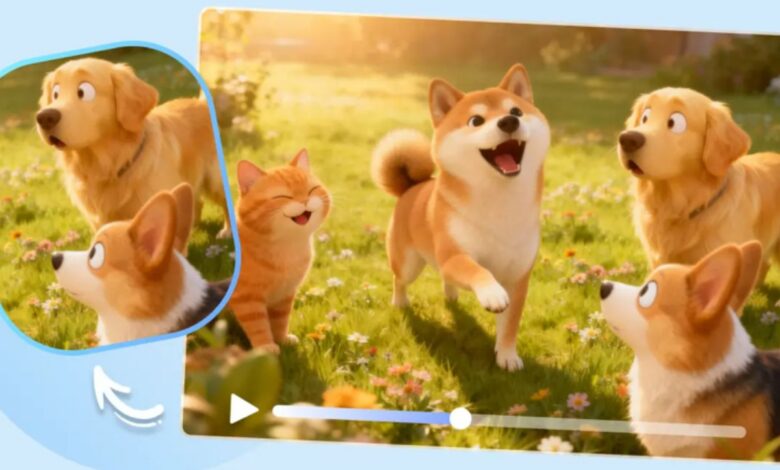
A great pet photo already has a lot going for it, the tilted head, the mid-run blur, an expression that looks suspiciously like an opinion. Anyone who’s lived with a pet knows the real charm is usually in the movement surrounding that photo, though, not just the single frame that got captured. Image to video tools finally let that photo catch up to the personality behind it, turning a still shot into a short, heartwarming scene. Dreamina, running on its most advanced video generation model, Seedance 2.5, makes that transformation easy enough to try with any favourite pet photo already sitting in a camera roll.
Why a pet photo is always halfway to moving already
Pets rarely hold still for long, and a photo usually captures one funny fraction of a much longer stretch of motion — ears flopping, a tail mid-wag, a head tilting at a sound just off-camera. Animating the photo simply lets that surrounding motion finally show up instead of staying frozen at one accidental instant that only tells part of the story.
What makes a pet video feel genuinely heartwarming
A handful of things separate a pet clip that feels charming from one that feels artificial. The motion should match the animal’s real personality rather than something generic. The pace needs to feel playful without becoming frantic. And small expressive details, an ear twitch, a slow blink, a head tilt, should stay intact, since those tiny gestures are usually what made the photo lovable in the first place.
Bringing your pet photo to life with Dreamina
Step 1: Upload your photo and describe the moment
Open Dreamina and head to the “AI Video” section, then use “Add reference image” to bring in your pet’s photo. From there, describe the motion and setting you’re picturing.
Here’s an example for a 30-second clip: “Using this puppy as reference, generate a 30-second video where the puppy tilts its head curiously, ears perking up, tail wagging gently, with soft natural light and grass swaying slightly in the breeze throughout.”
Step 2: Generate with Seedance 2.5
Pick the Seedance 2.5 model, choose your video length, then select an aspect ratio, 9:16 for Reels and TikTok, 1:1 for a feed post. Tap Dreamina’s generate icon and watch your pet come to life.
Step 3: Refine and export the finished clip
Run it through Dreamina’s editing tools first. Upscale sharpens fur detail and texture, Generate Soundtrack lays down a fun, upbeat layer, then export and share it with everyone who needs to see it.
What Seedance 2.5 brings to pet motion
Seedance 2.5, Dreamina’s most advanced video generation model, handles the kind of quick, expressive motion pet content depends on.
Movement that matches real animal energy
Authentic motion transfer keeps a wag, tilt, or trot looking natural rather than stiff, which is exactly the kind of subtle movement pets are known for.
Fur and lighting that feel soft and real
Reduced “AI look” keeps fur texture and lighting believable, avoiding the slightly artificial sheen that can undercut an otherwise charming clip.
Weight behind quick movements
Impact and momentum rendering gives movement like a jump or pounce real physical weight, so quick gestures still feel grounded rather than floaty.
Fixes without redoing the whole clip
Local editing lets a distracting background object be removed without regenerating the entire video, useful when the setting isn’t perfectly clean.
Capturing more than one side of a pet’s personality
Pets rarely have just one mode, and a single video doesn’t need to try to capture everything at once. A calmer, quieter clip showing curiosity can work just as well as a bouncy, high-energy one, depending on the moment. Creating a couple of shorter, distinct clips often ends up feeling more true to an actual pet’s range than cramming every quirk into one video.
Considering the dimensions of the actual pet
One tends to forget that when taking pictures from the below angle of view, even a smaller pet may seem larger due to distortion of perspective. However, when the pet is moving, the illusion vanishes, and it becomes apparent how big the pet is in fact. The indication of the actual size of the pet in the description of it in the prompt, small, compact, strong, prevents the distortion of the proportion of the pet by the model.
Writing prompts that capture real personality
Describing specific quirks — a particular head-tilt, a favorite toy, a signature reaction — helps the result feel like an actual pet rather than a generic animated animal.
Choosing the right setting and length
A short, punchy clip suits a quick social share, while a longer version works well for a birthday tribute or a memorial piece meant to be watched in full.
A few habits that flatten a pet video
Some choices tend to work against a heartwarming result:
- Choosing a blurry or poorly lit source photo as the reference
- Overloading the prompt with too many actions happening at once
- Skipping a soundtrack, which leaves a playful clip feeling oddly quiet
- Ignoring the pet’s actual setting, leading to a generic backdrop that doesn’t feel like home
Where these pet videos tend to be used
Social feeds, pet adoption pages, birthday and memorial tributes, and small pet businesses are where this format shows up most, since a pet in motion almost always outperforms a pet standing still in a photo posted alone.
A pet photo was always a story with a wagging tail attached. Seedance 2.5, running through Dreamina, is what finally lets that photo act just as goofy, and just as lovable, as the real thing.